
 US Dollars


Step-by-Step | Comprehensive Troubleshooting Guide for Pressure Washer
Step‑by‑Step| Comprehensive Troubleshooting Guide for Pressure Washers
Is your pressure washer not starting or operating correctly and you need a hand? You’re not alone. While your owner’s manual covers basic setup and operation, some issues require a bit more hands‑on troubleshooting.
This comprehensive guide walks you through proven steps that resolve most common pressure washer problems—from power and water flow issues to clogged nozzles and sensor concerns. If you still need help after following these steps, our support team is ready to assist.
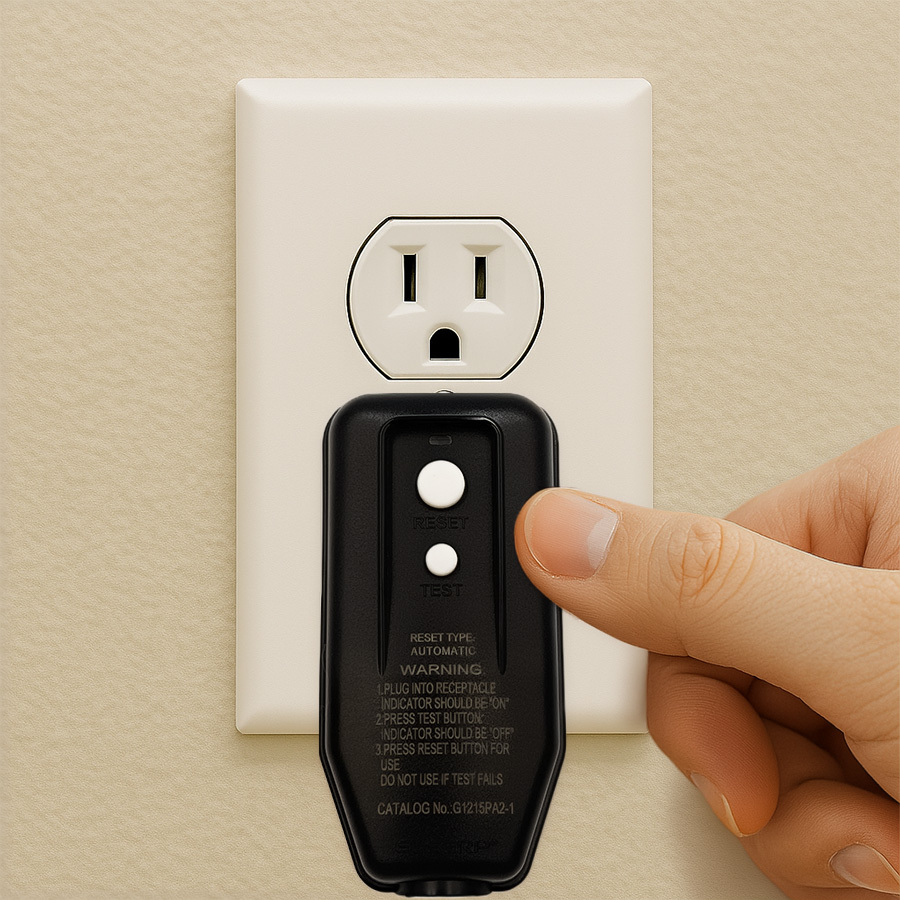
GFCI Plug Troubleshooting
Over the years, our pressure washers have used several GFCI plug designs. Follow the instructions below for standard rainproof GFCI plug models:
Standard Rainproof GFCI Features
- Two white buttons labeled RESET (top) and TEST (bottom)
- Green LED indicator located above or between the buttons
- Automatically resets when plugged into a power outlet
How to Test the GFCI Plug
- Plug the unit into a power outlet — the green light should turn on.
- Press TEST — the green light should turn off.
- Press RESET — the green light should turn back on.
If the plug fails at any step, it must be replaced.
Basic Reset Procedure
This reset often resolves startup issues related to trapped pressure.
- Assemble the machine as normal with the water supply connected, but leave the power OFF.
- Squeeze the spray gun trigger to allow water to flow.
- You should see water spray approximately 10 feet, even without power.
- While holding the trigger, switch the machine ON.
- If the unit starts, continue holding the trigger for 10 seconds, then release.
If the washer does not start, proceed to the next reset method.
Basic Reset With Plug
Perform this step only after attempting the standard Basic Reset.
- Assemble the unit normally, but leave it unplugged.
- Turn the power switch ON while the unit is still unplugged.
- Squeeze and hold the trigger to allow water to flow.
- While holding the trigger, plug the unit into the outlet.
- Run the washer for 30 seconds, then release the trigger.
Clogged Nozzle: Diagnosis & Solution
Common Symptoms
- No water and no power
- Weak or reduced water flow
- Machine cycles on and off when the trigger is pulled
- Low overall pressure
How to Clear a Clogged Nozzle
- Remove the nozzle tip.
- Use the supplied wire cleaning tool (or a thin piece of wire) to clear debris.
- If blockage remains, soak the nozzle tip in vinegar for 15 minutes.
- Reattach the nozzle.
- Test water flow without power — water should spray roughly 10 feet.
Perform the Bucket Test (Water Supply Check)
Purpose
To confirm adequate water flow:
- 4–6 gallons per minute (GPM)
- 40–60 PSI from the water source
How to Perform the Test
- Use a garden hose to fill a 5‑gallon bucket.
- Time how long it takes to fill completely.
- Ideal fill time: 50–70 seconds.
If the bucket fills outside this range, adjust the water supply before operating the washer.
Important Note
Other household appliances—such as washing machines, showers, or sprinkler systems—can reduce available water flow. Ensure they are off during operation.
Total Stop System (TSS)- Troubleshooting
If none of the previous steps resolve the issue, the internal Total Stop System sensor may be stuck.
Sensor Reset Method
- With water and power connected, hold the trigger to allow water to flow.
- While holding the trigger, lift the machine 4–5 inches and gently drop it.
- Repeat 2–3 times.
If the washer starts afterward, the sensor may be sticking and could require lubrication or replacement.
Need Further Assistance?
If your pressure washer is still not operating correctly, our support team is happy to help.
Call: 1‑866‑235‑5112
Hours: Monday–Friday, 8:00 AM – 5:00 PM CT
Chat: Click Here
You may also reach us by replying to your support email. We’re here to help get you back up and running.